It is 6:00 in the morning, your throat is raw, and the school needs your plans by 7:30. The substitute walking into your room has never met your students, does not know where the markers live, and has one page of notes to run a whole day. This list is for the teacher writing those plans.
This list collects the resources that make a substitute day work: ready-made sub plans and printable activities a sub can run with no prep, tools that carry the plan to the sub and keep it attached to the absence, staffing services that find the sub, and training for the sub who wants to do the job well. Every tool here was checked on its official website on November 13, 2026.
This is not a pile of generic lesson sites. Every entry either holds plans a substitute can teach, moves a plan from teacher to substitute, finds the substitute, or trains one.
Key takeaways
- SubHub attaches the lesson plan to the coverage request, so the sub sees it before arriving.
- Teach Starter and Twinkl hold large libraries of printable activities a sub can run with no prep.
- Frontline manages absences for whole districts; Swing Education staffs them with vetted substitutes.
- STEDI trains substitutes with an 8-hour online SubSkills course.
- Wheel of Names and Flippity are free no-prep tools a sub can open and run in minutes.
Quick comparison
| # | Tool | Best for | Grades / audience | Pricing | Free plan |
|---|---|---|---|---|---|
| 1 | carrying the lesson plan to the substitute | K–12 schools and districts | School license | unverified | |
| 2 | ready printables a sub can run | Elementary; classroom teachers | Free + paid | Yes | |
| 3 | a huge library of printable and digital resources | All grades; classroom and home | Free + paid | unverified | |
| 4 | managing absences across a district | K–12 districts | School license | No | |
| 5 | staffing substitute roles quickly | K–12 districts | School license | No | |
| 6 | training new substitute teachers | Substitute teachers; districts | Paid | unverified | |
| 7 | picking names, teams, and topics on the spot | All ages; any classroom | Free | Yes | |
| 8 | free classroom games a sub can run | All ages; any classroom | Free | Yes |
Make a tool for teachers?
Built something teachers love? We keep these guides fresh, so send us a new tool, updated pricing or a featured spot request.
Request a listingThe 8 best picks
- Pricing
- School license
- Free plan
- unverified
- Grades / audience
- K–12 schools and districts
SubHub is a coverage management system for K-12 schools that replaces the morning phone tree and the shared spreadsheet. A teacher requests coverage in a guided flow of about two minutes, attaches the lesson plan, and the request lands in an admin queue. Substitutes see open jobs with the plan status, claim the ones that fit, and get notified by SMS and email.
What we like
- Guided coverage request with the lesson plan attached inline
- Admin approval queue with bulk approve for a whole morning
- Substitutes claim open jobs with one tap and see the plan first
- One shared calendar for the whole school, in month, week, day, and agenda views
Watch out for
- Built for whole schools, so an individual teacher cannot sign up alone
- Lesson plans stay private until a substitute claims the job, which is good for privacy but means a sub sees the plan only after claiming
Pricing: Pricing was not stated on the official site; SubHub is sold to schools and districts.
- Pricing
- Free + paid
- Free plan
- Yes
- Grades / audience
- Elementary; classroom teachers
Teach Starter is a library of elementary teaching resources: worksheets, slides, crafts, templates, and activities built by teachers. A teacher can pull printables for a sub folder in minutes, choosing free resources or Plus Plan ones. The library is organized by topic and holiday, so a sub day around Thanksgiving or winter holidays is a quick search away.
What we like
- Printable worksheets, slides, crafts, and templates for elementary grades
- Resources organized by topic, holiday, and grade
- Free Plan resources alongside Plus Plan resources
- School Plan with shared invoicing and team management
Watch out for
- The School Plan needs a minimum of 5 licenses
- The library is large, so search by grade and subject rather than browsing
Pricing: Free plan with a selection of free resources; Plus Plan for full access. The School Plan is $73 per teacher per year, billed yearly, with a minimum of 5 licenses.
- Pricing
- Free + paid
- Free plan
- unverified
- Grades / audience
- All grades; classroom and home
Twinkl is a large library of printable and digital teaching resources that covers lesson planning, activities, and assessments across every subject and grade. A teacher leaving plans for a sub can find worksheets, PowerPoints, and activities for almost any topic in one place, and use them at school or at home. Twinkl sells memberships that cover the whole library for one price.
What we like
- Printable and digital resources across every subject and grade
- Lesson planning, activities, and assessments in one library
- Resources for classrooms and homes
- One membership covers the whole library
Watch out for
- Pricing was not listed on the pages we checked, so confirm the membership cost before budgeting for it
- The library is very large, so search for a topic rather than browsing the whole catalog
Pricing: Membership covers the full library; the price was not stated on the official site.
Frontline Absence Management
Best for: managing absences across a district
- Pricing
- School license
- Free plan
- No
- Grades / audience
- K–12 districts
Frontline Absence Management is the absence and substitute system inside Frontline Education's K-12 administration platform. It connects absences with hiring, onboarding, payroll, and professional development, so when a teacher reports an absence, the district can find and assign a substitute in the same system. It is built for districts, not for a single classroom.
What we like
- Absence reporting connected to substitute assignment
- Hiring, onboarding, payroll, absences, and professional development in one platform
- Built for district administration across many schools
- Part of Frontline's connected K-12 system
Watch out for
- Absence management is one part of a much larger administration platform
- Pricing requires a district quote
Pricing: Pricing was not stated on the official site; Frontline sells to districts by quote.
- Pricing
- School license
- Free plan
- No
- Grades / audience
- K–12 districts
Swing Education is a substitute staffing platform that helps school districts fill absences through a vetted marketplace of qualified substitutes. It covers daily subs, long-term teachers, paraprofessionals, special education support, and classified staff, and fills requests the same day, including absences called in with less than 12 hours notice. Schools set budgets by funding source with alerts before hitting a limit.
What we like
- Vetted marketplace of substitutes for daily and long-term roles
- Same-day and last-minute coverage, including overnight absence monitoring
- Budget controls by funding source with automatic spend alerts
- Integrates with major absence management systems
Watch out for
- A district-level service, not something an individual teacher signs up for
- Coverage depends on the substitutes available in your area
Pricing: Pricing was not stated on the official site; Swing works with districts under contract.
- Pricing
- Paid
- Free plan
- unverified
- Grades / audience
- Substitute teachers; districts
STEDI.org is the Substitute Teaching Division, continuing the work of the Substitute Teaching Institute founded at Utah State University in 1995. It trains substitute teachers through the SubSkills online course, an 8-hour program in classroom management and professional techniques, and trainees earn a SubDiploma on passing the assessment. Districts use it to recruit, train, and keep quality substitutes.
What we like
- 8-hour online SubSkills training course for substitutes
- SubDiploma on passing the course assessment
- Research-based training in classroom management and professional techniques
- Helps districts recruit, train, and retain substitute teachers
Watch out for
- Aimed at substitute teachers and the districts that hire them, not at lesson planning
- The course is a full program, not a quick read
Pricing: The SubSkills course is a paid training program; the price was not stated on the official site.
- Pricing
- Free
- Free plan
- Yes
- Grades / audience
- All ages; any classroom
Wheel of Names is a free online spinning wheel that picks a random name, team, or topic with one click. A substitute can type in the class list, spin to choose who answers next, or spin to pick a discussion topic, a group, or a game. It needs no account and no setup, so it works the moment a sub opens it in a browser.
What we like
- Free spinning wheel with no account and no setup
- Random name picker, team maker, and topic chooser
- Custom colors, sounds, and spin time, with shareable short links
- Works in 65 languages and imports lists from Google Sheets
Watch out for
- Ads keep the site free, so the page carries ads a sub may want to close first
- Wheels are saved in the browser or cloud, so a wheel built on one computer is not automatically on another
Pricing: Free. The site runs on ads, and you can close the ads for the session.
- Pricing
- Free
- Free plan
- Yes
- Grades / audience
- All ages; any classroom
Flippity is a collection of free educational tools that turn a simple list into classroom games and activities. A substitute can run flashcards, a random name picker, a tile puzzle, a virtual breakout, a cloze activity, or a quiz that earns a certificate, all in a browser, with a demo and instructions for each tool.
What we like
- Free tools including flashcards, random name picker, and tile puzzles
- Virtual breakout, cloze activity, and certificate quiz
- Every tool has a demo and an instructions page
- Games and tools run in a browser with no install
Watch out for
- Each tool has its own setup, so budget a few minutes before running a new one
- The tools are simple by design, so they suit warm-ups, reviews, and fillers more than full lessons
Pricing: Free, with no subscription.
How we chose
We started from tools PreK–6 teachers actually use and checked every one against its official website, pricing page and feature pages on November 13, 2026. We kept tools that fit elementary classrooms, noted whether a free plan exists, and wrote down honest limitations next to the strengths. Nobody paid to be included, and we don't use affiliate links on this page.
- Fit for PreK–6 classrooms, special education or homeschool
- Clear information on the official site about what the tool does and who it is for
- Free plan or free-for-teachers option noted where one exists
- Still active and maintained, with rebrands noted
How to choose the right tool
Build the sub folder before you need it. Pick two or three printable activities from Teach Starter or Twinkl, add a Wheel of Names and a Flippity game, and leave the folder on your desk. A sub day that starts with a folder beats one that starts with a search.
Separate the plan from the person: SubHub, Frontline, and Swing answer who covers the class, while Teach Starter, Twinkl, Wheel of Names, and Flippity answer what the class does.
Check whether your district already owns the answer. Frontline and Swing are district purchases, and STEDI training often comes through the district. Ask the office before paying for anything yourself.
Leave plans a stranger can teach. A sub has never met your students, so the plan needs the routine, the materials, and the backup activity written down. A good sub folder reads like a recipe, not a reminder to yourself.
Give the sub one no-prep tool that always works. Wheel of Names needs no account and no setup; Flippity runs in a browser after a few minutes of setup. Either one can carry a gap between activities.
Train the sub before the day, not during it. STEDI's 8-hour course is for a sub preparing for the job. If your school uses regular subs, point them at it in advance.
Best pick by situation
- You are sick at 6 a.m. and need the plan to reach your sub before the bell: SubHub — the lesson plan rides along with the coverage request
- You want a folder of printables any sub can run without prep: Teach Starter — printable activities with free and Plus plans
- Your district needs a qualified sub for tomorrow morning: Swing Education — a vetted marketplace of substitutes for daily and long-term roles
- Your sub has never taught before and needs training: STEDI — an 8-hour online SubSkills course with a SubDiploma
- Your sub needs a five-minute filler that works with any class: Wheel of Names — a free spinning wheel that picks names, teams, or topics
- Your sub needs a game the class can play with no setup: Flippity — free classroom games and tools that run in a browser
Pair it with printables
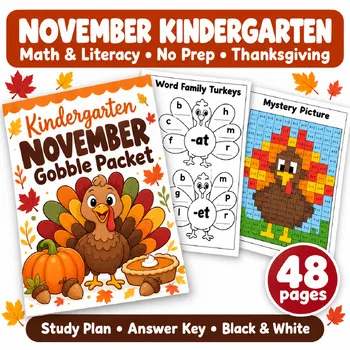
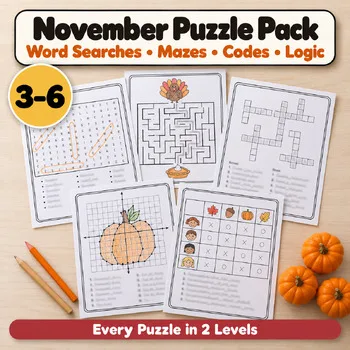
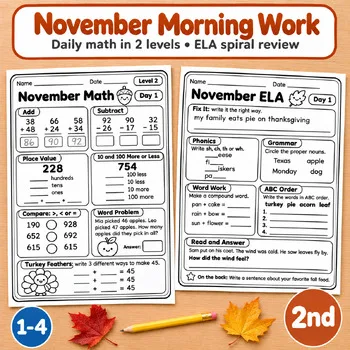
When the sub folder needs paper, these Activity Express printables are ready to print: a no-prep packet, early finisher puzzles, and morning work a substitute can run as-is.
Frequently asked questions
What should a teacher leave for a substitute?
The plan, the routine, and a backup activity. SubHub carries the plan to the sub; Teach Starter and Twinkl supply the printable activities; Wheel of Names and Flippity fill the gaps. The plan should name where materials live and what to do when the class finishes early.
Can a substitute use these tools without an account?
Wheel of Names and Flippity need no account. Teach Starter and Twinkl need an account for full access. SubHub, Frontline, and Swing Education are school or district systems, so the sub uses the school's account.
Who pays for substitute staffing tools?
The district. Frontline and Swing Education work under district contracts, and STEDI training often comes through the district too. A classroom teacher pays for nothing here except a Teach Starter or Twinkl membership if they choose one.
What is the best free tool for a substitute teacher?
Wheel of Names, for picking names and running routines with no setup, and Flippity, for free classroom games. Both run in a browser and cost nothing.
How does a substitute get training?
STEDI.org runs the SubSkills course, an 8-hour online program in classroom management and professional techniques, with a SubDiploma on passing the assessment. It is the training arm of the Substitute Teaching Institute founded at Utah State University in 1995.
Make a tool for teachers?
Built something teachers love? We keep these guides fresh, so send us a new tool, updated pricing or a featured spot request.
Request a listingDisclosure: no tool on this page paid to be included and we don't earn commissions from these links. Featured placements, if we ever offer them, will be clearly labeled "Sponsored". Details were checked on each provider's official website on November 13, 2026 and can change.