It is 10:15, and the wall clock says so plainly. Half the class reads it right; the other half reads the minute hand as the hour hand and announces it is 3:50. Telling time is one of those skills that looks simple from the front of the room and turns out to be three skills at once: reading numbers on a dial, understanding that the hour hand moves slowly while the minute hand races, and connecting both to a digital display.
The tools below teach all three, and they do it by letting children move the hands themselves. There are leveled games that start at the hour and work up to five minutes, a whole-class teaching clock you can project, a worksheet generator for quick practice, and a plain-English explainer with a clock children can drag around. Every one of them is free to start, and most are entirely free.
How we picked: we checked each tool's official website on November 3, 2026 and only describe features and plans we could see there. We weighted fit for grades K–3, whether a teacher can start without paying, and whether the tool lets children set a time themselves instead of only picking an answer.
Key takeaways
- Best free starting point: Toy Theater, with adjustable practice from the hour to the minute and no account needed.
- Best for whole-class teaching: Topmarks' Teaching Clock, which projects three clocks at once in analog and digital formats.
- SplashLearn gives the most leveled practice, with separate games for hours, half hours, quarter hours, and five minutes.
- Education.com has 15 ready telling-time games for kindergarten to 2nd grade, with worksheets on the same site.
- Starfall's free worksheet generator makes quick analog and digital clock practice on paper.
Quick comparison
| # | Tool | Best for | Grades / audience | Pricing | Free plan |
|---|---|---|---|---|---|
| 1 | a first telling-time game | PreK–grade 6 | Freemium | Yes | |
| 2 | leveled time games by skill | PreK–grade 5 | Freemium | Free for teachers | |
| 3 | adjustable telling-time practice | Elementary | Free | Yes | |
| 4 | lots of short time games | Grades 1–3 | Free | Yes | |
| 5 | 15 ready telling-time games | Kindergarten–grade 2 | Freemium | Yes | |
| 6 | projecting a teaching clock | Ages 5–11 | Free | Yes | |
| 7 | quick telling-time worksheets | PreK–grade 5 | Free + paid | Free (nonprofit) | |
| 8 | explaining how clocks work | Elementary and up | Free | Yes |
Make a tool for teachers?
Built something teachers love? We keep these guides fresh, so send us a new tool, updated pricing or a featured spot request.
Request a listingThe 8 best picks
- Pricing
- Freemium
- Free plan
- Yes
- Grades / audience
- PreK–grade 6
ABCya!'s Learn to Tell Time game turns a lost cat in a rocket into a reason to read a clock. Children set the time by moving the clock hands or clicking buttons, and the game runs through four levels that start at the hour and add minutes from level two onward. Players can work with a digital or an analog clock.
What we like
- Four levels that build from the hour to minutes
- Children set the hands themselves, by dragging or clicking
- Choice of digital or analog clock
- Skills practiced: telling time, writing time, and using digital and analog clocks
Watch out for
- The game page suggests turning off an ad blocker if the game does not load.
- No price for the membership is shown on the pages checked.
Pricing: Free games are available each week; a paid membership unlocks 300+ games.
- Pricing
- Freemium
- Free plan
- Free for teachers
- Grades / audience
- PreK–grade 5
SplashLearn breaks telling time into small skills and gives each one its own game: the hour hand, reading time in hours, interpreting time, setting time, and selecting the matching clock. The same structure continues into half hours, quarter hours, time to the nearest five minutes, and AM and PM, so a child can work through the sequence in order. The site also has a free Telling Time Tool for whole-class demonstration.
What we like
- Separate games for hours, half hours, quarter hours, and five minutes
- Games where children set the time on a virtual analog clock
- Free Telling Time Tool for demonstrations
- Worksheets and free K–5 lesson plans on the same site
Watch out for
- Family pricing is not shown on the pages checked.
- A free account is needed to save a child's progress.
Pricing: Classroom use is free for teachers; lesson plans and teaching tools are free to use.
- Pricing
- Free
- Free plan
- Yes
- Grades / audience
- Elementary
Toy Theater's telling-time game asks children to help a little aviator catch his flight by clicking the correct digital time. The teacher controls the difficulty: choose the skill, from the hour down to the minute, pick an analog or digital display, switch between 12-hour and 24-hour formats, and show or hide the minute numbers for a harder challenge. The site is free, with no account needed.
What we like
- Skill controls from the hour down to the minute
- 12-hour or 24-hour digital display
- Minute numbers can be shown or hidden
- Free teacher tools on the same site, including a timer and a spinner
Watch out for
- The game is one activity, not a curriculum, so it works best as practice after a lesson.
- The site's own text notes that telling time also supports fractions and skip counting by fives.
Pricing: Free — the site describes itself as a source for free educational games.
- Pricing
- Free
- Free plan
- Yes
- Grades / audience
- Grades 1–3
Turtle Diary's time games hub holds dozens of short telling-time games for grades 1–3, each focused on one small job: matching analog and digital clocks, completing clock patterns by rotating the hands, estimating time on a rotated clock, and setting hands to a given time. The games cover hours, minutes, quarters, seconds, and AM and PM, and children also link times to daily activities.
What we like
- Analog-to-digital matching games for hours, minutes, and quarters
- Clock-pattern games where children rotate the hands
- Tick Tock Time, where children set the hands to match a given time
- Games link times to daily activities and being on time
Watch out for
- Some older games on the site note that browsers no longer support Flash, so test a game before assigning it.
- A login is needed to rate activities and track progress.
Pricing: Free to play; a free login tracks progress.
- Pricing
- Freemium
- Free plan
- Yes
- Grades / audience
- Kindergarten–grade 2
Education.com's telling-time page lists 15 games for kindergarten through 2nd grade, covering the hour, half-hour, quarter-hour, and five minutes, plus AM and PM. Children match digital and analog clocks, set a clock to five-minute increments, stop a clock at a target time, and listen for the right clock in an audio game. Printable worksheets and lesson plans on telling time sit on the same site.
What we like
- 15 telling-time games for kindergarten to 2nd grade
- Matching, setting, and listening games for analog and digital clocks
- Quarter-hour and five-minute practice for 2nd grade
- Printable worksheets and lesson plans on the same site
Watch out for
- Most of the games need a free account to play.
- School pricing is by quote, not listed on the site.
Pricing: Free Basic accounts get 3 resources per month; Premium gives unlimited access.
- Pricing
- Free
- Free plan
- Yes
- Grades / audience
- Ages 5–11
Topmarks' Teaching Clock is an open-ended classroom tool rather than a game. It shows three clocks at once and lets the teacher demonstrate how the hour and minute hands move together, in analog and digital formats, in 12-hour or 24-hour time. Each clock can show the current time, a random time, or any given AM or PM time, so it works for a quick demonstration or a full lesson on the whiteboard.
What we like
- Three clocks shown together for comparison
- Analog and digital displays in 12-hour or 24-hour format
- Set the current time, a random time, or any given time
- Children can read times or be asked to show a time, such as an hour earlier or later
Watch out for
- Topmarks is a UK site, so times are written in analogue style and ages are given in years, not grades.
- It teaches but does not quiz, so it gives no scores or records.
Pricing: Free.
- Pricing
- Free + paid
- Free plan
- Free (nonprofit)
- Grades / audience
- PreK–grade 5
Starfall is a nonprofit whose free Learn-to-Read program is funded by members, and a paid membership unlocks the full site from Pre-K through 5th grade, including math and measurement. For telling time, its Parent-Teacher Center has a free 'What is the Time?' worksheet generator: pick analog or digital, choose a layout of six, eight, or ten clocks, and create a PDF where children circle the matching digital clock or write the time in a blank clock.
What we like
- Free 'What is the Time?' worksheet generator with analog and digital options
- Six, eight, or ten-clock layouts with a create-PDF button
- Math songs that introduce time, days of the week, and months
- Membership unlocks full Pre-K to 5th-grade coverage, including measurement
Watch out for
- The worksheet generator lives on the Parent-Teacher Center, not the main children's site.
- No membership price is shown on the pages checked.
Pricing: Core Learn-to-Read content is free, and a paid membership unlocks the full site with home and teacher or school options.
- Pricing
- Free
- Free plan
- Yes
- Grades / audience
- Elementary and up
Math is Fun's Clocks page is the clearest plain-English explainer in this list: digital clocks show hours and minutes as numbers, analog clocks use a little hand for hours and a big hand for minutes, and the hour hand creeps slowly toward the next hour as the minute hand goes around. The same page links to an analog and digital clock animation where children move the hands themselves, and to time worksheets for practice.
What we like
- Plain explanation of digital and analog clocks
- Analog and digital clock animation with movable hands
- Worked examples such as half-past two and quarter-past five
- Time worksheets linked from the same page
Watch out for
- This is a reference page with an animation, not a leveled game, so it gives no practice sets on its own.
- The site is text-heavy, so younger children will need the animation rather than the reading.
Pricing: Free.
How we chose
We started from tools PreK–6 teachers actually use and checked every one against its official website, pricing page and feature pages on November 3, 2026. We kept tools that fit elementary classrooms, noted whether a free plan exists, and wrote down honest limitations next to the strengths. Nobody paid to be included, and we don't use affiliate links on this page.
- Fit for PreK–6 classrooms, special education or homeschool
- Clear information on the official site about what the tool does and who it is for
- Free plan or free-for-teachers option noted where one exists
- Still active and maintained, with rebrands noted
How to choose the right tool
Start with the hour, not the minute. If a child cannot yet tell time to the hour, a five-minute game will only frustrate them. ABCya!'s first level, SplashLearn's time-in-hours games, and Toy Theater's hour-only setting all start there.
Teach with a clock you can move, then practise with a game. Project Topmarks' Teaching Clock or the Math is Fun animation, move the hands together, and ask the class to read each new time before anyone touches a device.
Match the tool to the display. Some children learn on analog clocks and freeze at digital ones, and the reverse is just as common. ABCya!, Toy Theater, and Turtle Diary all let children work with both, so use them when the gap shows up.
Check the account before the lesson. Toy Theater, Topmarks, and Math is Fun need nothing at all, while Education.com, SplashLearn, and Turtle Diary work best with a free account or login. A tool that needs a login you have not made is not a five-minute starter.
End on paper. After the screen, hand out a Starfall 'What is the Time?' sheet or a clock from the printables below and ask children to draw the hands. If they can set a time on paper, they have learned it; if they can only click it, they have only played it.
Best pick by situation
- You want a free telling-time game with no account and no setup: Toy Theater — it opens straight into play with adjustable difficulty
- You are teaching the whole class from the whiteboard: Topmarks — the Teaching Clock projects three clocks at once
- Your students need leveled practice from the hour to five minutes: SplashLearn — each skill has its own game in order
- You need a quick worksheet for tomorrow morning: Starfall — the generator makes a clock worksheet as a PDF in a minute
- A child is confused about what the hands mean: Math is Fun — its Clocks page explains the hands in plain English
- You want many short games for a math center rotation: Turtle Diary — its time hub has dozens of short games for grades 1–3
- You want games plus worksheets in one place: Education.com — 15 games and printable telling-time worksheets together
Pair it with printables
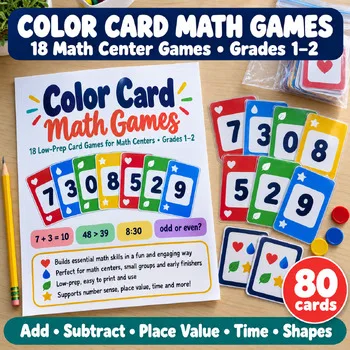
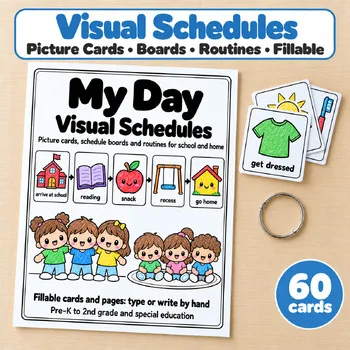
The store has no dedicated telling-time printable yet — the math card games include a Make the Time game for grades 1–2, and the visual schedules help young children connect clock times to their day.
Frequently asked questions
What is the best free telling-time tool for elementary school?
Toy Theater is the strongest free starting point: no account, adjustable from the hour to the minute, and both analog and digital displays. Topmarks' Teaching Clock is the best free tool for whole-class teaching.
Should children learn analog or digital clocks first?
Start with analog. The moving hands show time passing, which is the idea underneath the numbers. The tools here that let children move the hands — Topmarks, Math is Fun, Toy Theater, and SplashLearn — all make that visible, and digital practice can follow once the hour and minute hands make sense.
What age should children start learning to tell time?
Most children start with the hour in kindergarten or 1st grade, then half hours and quarter hours in 2nd grade, and five minutes in 2nd or 3rd grade. The games here follow that order: start with ABCya!'s first level or SplashLearn's time-in-hours games.
Do these tools need an account?
Toy Theater, Topmarks, and Math is Fun need no account at all. ABCya!, SplashLearn, Education.com, and Turtle Diary work best with a free account, and Starfall's worksheet generator is free without one.
How do I pair these tools with printables?
Teach with the clock on screen, practise with a game, then hand out paper. The math card games below include a Make the Time game for grades 1–2, and the visual schedules help young children connect clock times to their day.
Make a tool for teachers?
Built something teachers love? We keep these guides fresh, so send us a new tool, updated pricing or a featured spot request.
Request a listingDisclosure: no tool on this page paid to be included and we don't earn commissions from these links. Featured placements, if we ever offer them, will be clearly labeled "Sponsored". Details were checked on each provider's official website on November 3, 2026 and can change.