Every elementary teacher knows the spot. A corner of the classroom with cardboard, tape, scissors and a few odd tools becomes the most popular place in the room. Students who drift through a worksheet will spend forty minutes building a bridge, testing it, watching it fall, and building it again. That corner is a makerspace, and it does not need a big budget or a special room — it needs the right kits.
The eight kits below are physical things students can hold, snap, cut and wire together. There are monthly STEAM crates, an invention kit that turns bananas into keyboards, snap-together electronics, cardboard construction tools, straw building sets, pocket-sized coding robots, a robotics kit that brings craft supplies to life, and magnetic robot blocks for the youngest makers. All were checked on their own official sites on November 5, 2026.
We picked a mix of big names and small independent makers, and every kit here is in stock and sold to schools today. Prices are the official prices from each maker's own site, and where a kit has free lesson plans or a free trial we say so. No tool here paid to appear.
Key takeaways
- Best first kit: Makey Makey, at $51.95 for the Classic, turns everyday objects into touchpads and works with Scratch.
- Strawbees is the whole-class pick, with a 4,000-piece STEAM Classroom Kit and free digital lessons — and it is now part of BirdBrain Technologies.
- Makedo is the cheapest way in: one Invent Kit at $187.50 AUD equips 12 to 24 makers with reusable cardboard tools.
- Cubelets suits the youngest makers at ages 4 and up, with magnetic blocks that snap together into working robots with no screen.
- Budget for consumables as well as kits — straws, markers, paper and batteries run out, while the tools themselves are reusable.
Quick comparison
| # | Tool | Best for | Grades / audience | Pricing | Free plan |
|---|---|---|---|---|---|
| 1 | monthly build projects for the whole class | Ages 3–16+ | Paid | No | |
| 2 | turning everyday objects into inventions | Elementary and up | Paid | No | |
| 3 | first electronics for grades 3–5 | Grades 3–5 | Paid | No | |
| 4 | cardboard construction on a tiny budget | Ages 5–12 | Paid | Yes (free resources) | |
| 5 | whole-class building with free lessons | Elementary and up | Paid | Yes (free lessons) | |
| 6 | screen-free coding that fits in a pocket | Grades K–5 | Paid | Yes (free lessons) | |
| 7 | turning craft supplies into robots | Elementary and up | Paid | Yes (free lesson plans) | |
| 8 | screen-free robots for the youngest makers | Ages 4 and up | Paid | Yes (free lessons) |
Make a tool for teachers?
Built something teachers love? We keep these guides fresh, so send us a new tool, updated pricing or a featured spot request.
Request a listingThe 8 best picks
- Pricing
- Paid
- Free plan
- No
- Grades / audience
- Ages 3–16+
KiwiCo sends monthly crates of hands-on STEAM projects — build a robot hand, a marble run, a light-up globe — with all the materials and instructions in the box. The education catalog sells classroom packs and bundles, so a teacher can order the same project for every student. Projects cover science, art, engineering and design, and each crate is a complete lesson in a box.
What we like
- Monthly STEAM crates with hands-on science, art, engineering and design projects
- Education catalog with classroom packs and bundles for schools
- Projects for ages 3 to 16+, so one supplier can cover the whole school
- Educators get 10% off orders of 10 or more crates with code EDU10
Watch out for
- Each crate's materials are used up by the project, so a class needs a new crate per student or group
- Check the education catalog rather than the home store for classroom pricing
Pricing: Subscriptions from about $24 a month per crate; classroom packs and bundles available, and educators get 10% off orders of 10 or more crates with code EDU10.
- Pricing
- Paid
- Free plan
- No
- Grades / audience
- Elementary and up
Makey Makey is a small circuit board that lets students turn everyday objects into computer controls. Clip an alligator lead to a banana and it becomes a space bar; clip one to a pencil drawing and it becomes a piano key. It works with Scratch and any program that takes keyboard input, with no software to install. The STEM Pack is the classroom version: twelve Classic boards with lesson plans for invention literacy — learning by making things that work.
What we like
- Turns everyday objects into keys and touchpads through alligator clips
- Works with Scratch and any program that takes keyboard input
- No software to install — it plugs in over USB and works like a keyboard
- STEM Pack classroom kit includes 12 Classic boards and lesson plans
Watch out for
- Alligator clips and conductive materials wear out and need replacing
- The GO board is smaller and simpler than the Classic, so check which one your project needs
Pricing: Classic $51.95; GO $19.95; STEM Pack classroom kit $724.95 (12 Classic boards).
- Pricing
- Paid
- Free plan
- No
- Grades / audience
- Grades 3–5
Snap Circuits are electronics kits where color-coded parts snap onto a plastic grid to build real working circuits — a light that turns on, a fan that spins, an alarm that sounds. There is no soldering and no loose wire to strip, so grades 3 to 5 students can build on their own. The Classroom Activity Kit is the school version, with six activity kits and six student workbooks, and the parts are reusable year after year.
What we like
- Color-coded electronic components snap onto a grid — no soldering or tools
- Students build real working circuits: lights, sounds, fans and alarms
- Classroom Activity Kit includes 6 activity kits and 6 student workbooks
- Parts are reusable across projects and across school years
Watch out for
- Small parts need organised storage, or pieces go missing fast
- Check whether batteries are included before you plan a lesson around a kit
Pricing: Classroom Activity Kit $499 (6 activity kits and 6 student workbooks); individual kits sold separately.
- Pricing
- Paid
- Free plan
- Yes (free resources)
- Grades / audience
- Ages 5–12
Makedo makes safe, reusable tools for building with recycled cardboard: a safe-saw that cuts it, a scru that joins pieces without glue or tape, and a scrudriver that tightens the joints. One Invent Kit equips 12 to 24 makers, and the tools last for years while the cardboard is free. The Makedo education page has free classroom resources and project ideas, and the tools are safety-tested to age 3 and up, so younger siblings can join in too.
What we like
- Safe-saw cuts cardboard safely, with no sharp blade
- Scru joins cardboard pieces without glue or tape, and a scrudriver tightens them
- Tools are reusable across projects and across school years
- Free classroom resources and project ideas on the Makedo education page
Watch out for
- Prices are in Australian dollars and shipping is international, so check the final total
- You supply your own cardboard — ask families to save boxes
Pricing: Invent Kit $187.50 AUD (listed on sale from $250.00 AUD) for 12 to 24 makers; free education resources on the site.
- Pricing
- Paid
- Free plan
- Yes (free lessons)
- Grades / audience
- Elementary and up
Strawbees is a construction system of precut straws and color-coded connectors. Students push straws into connectors to build bridges, towers, marble runs and moving models, and the free Strawbees Classroom lessons turn each build into a science or engineering lesson. The STEAM Classroom Kit holds more than 4,000 pieces, enough for a whole class to build at once. Strawbees was acquired by BirdBrain Technologies in September 2025 and continues under that brand.
What we like
- STEAM Classroom Kit with more than 4,000 pieces for a whole class
- Five precut straw sizes and four color-coded connectors
- Strawbees Classroom digital lessons are free
- The range includes robotics add-ons that connect to micro:bit
Watch out for
- Straws are consumables and need restocking as classes use them up
- Small connectors are easy to lose — sorting tubs help
Pricing: STEAM Classroom Kit (4,000+ pieces) sold through the official store; Strawbees Classroom digital lessons are free.
- Pricing
- Paid
- Free plan
- Yes (free lessons)
- Grades / audience
- Grades K–5
Ozobot Evo is a pocket-sized robot that students program by drawing color codes on paper — a black line with a red-blue-green sequence tells it to spin, speed up or turn. No screen is needed, which makes it a good first robot for K–2. Older students move on to Ozobot Blockly, a block-coding app. The Evo Entry Kit includes one robot and more than 700 free lessons, and classroom kits scale up to 18 robots.
What we like
- Color codes drawn on paper program the robot with no screen
- Ozobot Blockly adds block coding for older students
- More than 700 free lessons on the Ozobot site
- Classroom kits of 6, 12 or 18 robots for shared use
Watch out for
- Markers and paper are consumables — keep spares in the makerspace
- Check the robot-to-student ratio before ordering a classroom kit
Pricing: Evo Entry Kit $175 (1 robot, 700+ free lessons); classroom kits of 6 robots $999, 12 robots $2,050, 18 robots $2,990.
Hummingbird Robotics Kit
Best for: turning craft supplies into robots
- Pricing
- Paid
- Free plan
- Yes (free lesson plans)
- Grades / audience
- Elementary and up
The Hummingbird Bit is a robotics kit with a different idea: instead of a fixed robot, students get lights, sensors and motors and attach them to whatever they build — cardboard, fabric, recycled materials, clay. A paper dragon gets glowing eyes and a flapping wing; a cardboard house gets a door that opens when someone walks past. Free lesson plans come with it, and it runs on a micro:bit, sold with the kit or separately.
What we like
- Lights, sensors and motors that attach to cardboard, fabric and recycled materials
- Students build a robot from anything, not from a fixed set of parts
- Free lesson plans on the BirdBrain site
- Works with micro:bit, with kits sold with or without one
Watch out for
- Without a micro:bit the kit does nothing, so check which version you are ordering
- Motors and sensors are small parts that need organised storage
Pricing: Premium Kit $230 with micro:bit / $210 without; Base Kit $130; Starter Flock (4 kits) $920; Classroom Solution $4,730.
- Pricing
- Paid
- Free plan
- Yes (free lessons)
- Grades / audience
- Ages 4 and up
Cubelets are magnetic robot blocks, and each block has a job: one senses light, one thinks, one drives, one lights up. Students snap them together and the robot works — a light-sensing block next to a drive block makes a robot that chases light, with no screen and no wiring. They are made for ages 4 and up, so they are the rare robotics kit a kindergarten class can use without help. Free lessons are on the site, and US educators can request a free review kit.
What we like
- Magnetic blocks snap together — each block senses, thinks or acts
- No screen, no wiring and no coding needed to build a working robot
- Free lessons and resources on the Modular Robotics site
- Free review kit for US educators, and a one-year warranty
Watch out for
- Individual blocks are pricey to replace if one is lost or broken
- The classroom packs are a big investment — start small and scale up
Pricing: Discovery Set $225; Curiosity Set $399; Intrepid Inventors Pack $5,779 (6 or 12 student groups); free US shipping on orders over $100.
How we chose
We started from tools PreK–6 teachers actually use and checked every one against its official website, pricing page and feature pages on November 5, 2026. We kept tools that fit elementary classrooms, noted whether a free plan exists, and wrote down honest limitations next to the strengths. Nobody paid to be included, and we don't use affiliate links on this page.
- Fit for PreK–6 classrooms, special education or homeschool
- Clear information on the official site about what the tool does and who it is for
- Free plan or free-for-teachers option noted where one exists
- Still active and maintained, with rebrands noted
How to choose the right tool
Start with one station, not a whole room. Pick the kit that matches the age you teach most, use it for a term, and let student demand decide what you buy next. A makerspace that grows slowly gets used.
Match the kit to the age, not the marketing. Cubelets and Makedo are built for the youngest makers. Makey Makey, Snap Circuits and Hummingbird suit grades 3 and up, when students can follow a circuit diagram or a coding idea without constant help.
Budget for consumables, not just the kit. The tools are usually reusable, but straws, markers, paper, batteries and cardboard run out. A kit with a $200 price tag can cost another $50 a term in supplies if the whole school uses it.
Check storage and charging before you order. Small robots need a charging spot and a box with a lid. Straws and connectors need sorting tubs. If a kit cannot be packed away in five minutes, it will not survive a shared classroom.
Look for free lessons first. Ozobot, Strawbees, Hummingbird and Cubelets all publish free lesson plans and project ideas. A kit with good free lessons saves hours of planning.
Best pick by situation
- You have $200 and a shelf to fill: Makedo — one Invent Kit equips 12 to 24 makers with reusable tools
- You want a robot station for K–2: Cubelets — magnetic blocks snap together with no screen
- You want electronics without soldering: Snap Circuits — color-coded parts snap onto a grid
- You want students to invent with craft supplies: Hummingbird Robotics Kit — lights, sensors and motors attach to anything
- You want a kit that arrives every month: KiwiCo — a new STEAM crate lands each month
Pair it with printables
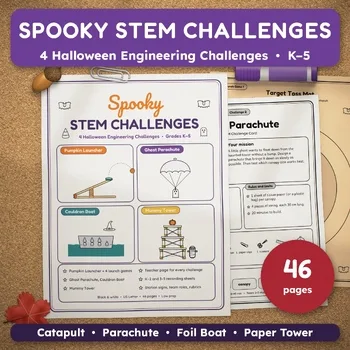
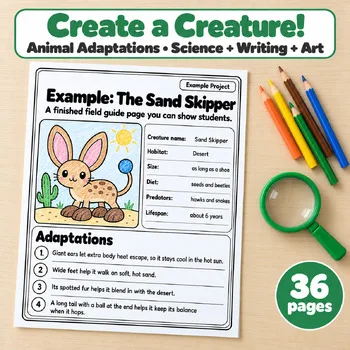
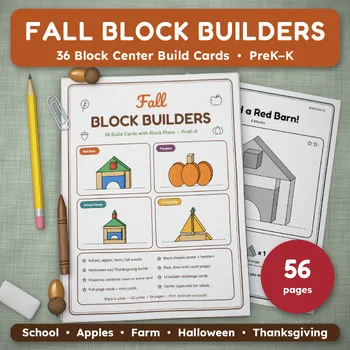
These printables from our store pair with the kits above — STEM build challenges, an invent-a-creature project and block-building cards that give makerspace time a clear task.
Frequently asked questions
How much does it cost to start a school makerspace?
Less than most teachers expect. One station starts under $250: a Makedo Invent Kit ($187.50 AUD) plus a Makey Makey GO ($19.95) gives a whole class cardboard building and invention work. A full classroom set of one kit, such as the Snap Circuits Classroom Activity Kit at $499, lands in the $500 to $1,000 range. Start with one kit, use it for a term, then add a second.
Do these kits need computers?
Some do and some do not. Makey Makey needs a computer with a USB port, and the Hummingbird kit needs a micro:bit to run. Cubelets, Makedo, Strawbees and Snap Circuits need no screen at all, and Ozobot robots follow color codes drawn on paper. If your makerspace has no computers, start with the screen-free kits.
Which kit is best for the youngest students?
Cubelets, made for ages 4 and up, is the easiest starting point — magnetic blocks snap together and the robot simply works. Makedo suits ages 5 to 12, and KiwiCo has crates starting at age 3. Save Makey Makey and Hummingbird for grades 3 and up, when students can handle wiring and coding ideas.
What will I need to keep buying?
Mostly consumables. Cardboard is free if families save boxes, and Makedo tools are reusable. Strawbees straws, Ozobot markers and paper, and batteries run out and need restocking. Budget a small amount each term, and ask families to donate cardboard, bottle caps and fabric scraps.
Can one kit serve a whole school?
Yes, if you buy the classroom version. The Strawbees STEAM Classroom Kit holds more than 4,000 pieces, the Snap Circuits Classroom Activity Kit includes six activity kits and six workbooks, and the Cubelets Intrepid Inventors Pack supports six or twelve working groups. Otherwise buy one kit and rotate it between classes on a weekly timetable.
Make a tool for teachers?
Built something teachers love? We keep these guides fresh, so send us a new tool, updated pricing or a featured spot request.
Request a listingDisclosure: no tool on this page paid to be included and we don't earn commissions from these links. Featured placements, if we ever offer them, will be clearly labeled "Sponsored". Details were checked on each provider's official website on November 5, 2026 and can change.