Most elementary teachers end up making some of their own materials: a quick review game, a worksheet that matches this week's spelling list, a poster for the hallway, or a digital version of a paper page for students who are absent. The tools on this list cover that whole range, from activity generators and design apps to PDF annotation tools, plus the clip art and fonts that teacher-authors use to make printables look finished.
We chose tools that fit PreK-6 classrooms and that offer a free plan, a free tier for teachers, or at least a trial, so you can test them before spending money. A few are aimed squarely at teachers who create and sell resources, which is why an independent clip art shop and a teacher font designer are included.
Every feature and price below was checked on the tool's official website on October 29, 2026. Where a site didn't show something, such as license details or a price, we say so instead of filling the gap.
Key takeaways
- Best free option: Canva for Education, free for verified K-12 teachers and their students.
- Best for one-click review games you can also print: Wordwall (free Basic plan with up to 3 activities).
- Best for turning existing PDFs into digital work: Kami or Classwork Studio (formerly TeacherMade).
- Best for special-needs and primary worksheet software: Worksheet Crafter (German company, 14-day trial).
- For teacher-authors: Educlips for clip art and KG Fonts for handwriting-style fonts, both with commercial licensing to check.
Quick comparison
| # | Tool | Best for | Grades / audience | Pricing | Free plan |
|---|---|---|---|---|---|
| 1 | quick review games that also print | Teachers; grades not stated | Freemium | Yes | |
| 2 | free worksheets, posters and slides | K-12 teachers and students | Free | Free for teachers | |
| 3 | making existing PDFs interactive | K-12 teachers, SPED and multilingual specialists | Freemium | Yes | |
| 4 | interactive worksheets and a shared library | Teachers and students; filterable by grade and age | Freemium | Yes | |
| 5 | storyboards and visual worksheets | All grades; teachers and students | Freemium | Yes | |
| 6 | converting PDFs to auto-graded activities | K-12 teachers, campus and district leaders | Free + paid | unverified | |
| 7 | primary and special-needs worksheets | Primary and special education teachers | Paid | Trial only | |
| 8 | classroom-themed clip art for printables | Teacher-authors and TPT sellers | Paid | No | |
| 9 | friendly fonts for classroom printables | Teachers, teacher-authors, crafters | Paid | unverified |
Make a tool for teachers?
Built something teachers love? We keep these guides fresh, so send us a new tool, updated pricing or a featured spot request.
Request a listingThe 9 best picks
- Pricing
- Freemium
- Free plan
- Yes
- Grades / audience
- Teachers; grades not stated
Wordwall turns a short list of words or questions into an activity such as a quiz, match up, group sort or spin the wheel. A teacher can project it for whole-class review, send it to student devices, then switch the same content into a different template with one click. Any interactive activity can also be printed as a worksheet.
What we like
- Templates including quiz, match up, flash cards, group sort and complete the sentence
- One-click switching between templates without retyping content
- Printable worksheet versions of interactive activities
- Searchable community library of teacher-made activities to play or edit
Watch out for
- Basic is limited to 3 activities.
- The company appears to be UK-based, so prices may be set or converted from another currency.
Pricing: Free Basic plan (up to 3 activities); Standard was listed at $57.60 per year and Pro at $86.40 per year, with separate school plans.
- Pricing
- Free
- Free plan
- Free for teachers
- Grades / audience
- K-12 teachers and students
Canva for Education gives verified K-12 teachers and their students free access to Canva's editor and premium content. Teachers start from editable templates for worksheets, lesson plans, posters and presentations, then share designs as assignments in a class space. Students can collaborate on group projects in real time.
What we like
- Free for K-12 teachers and their students after teacher verification
- Thousands of editable templates, including worksheets and lesson plans
- Class space for sharing assignments, reviewing work and commenting
- Works with Google Classroom, Microsoft Teams, Remind and Clever
Watch out for
- Verification is required before the education features unlock.
- Check Canva's license terms before using its elements in products you plan to sell.
Pricing: Free for verified K-12 teachers and their students.
- Pricing
- Freemium
- Free plan
- Yes
- Grades / audience
- K-12 teachers, SPED and multilingual specialists
Kami turns existing resources such as PDF worksheets into interactive assignments that students annotate on screen. Teachers push the file through their LMS, students write, highlight and respond, and accessibility tools help students who need translation or extra support. AI-powered tools can help with auto-grading and building new assessments.
What we like
- Annotation tools for turning static worksheets into interactive work
- Understand tools with translation in over 100 languages
- AI-assisted auto-grading and assessment creation
- Integrations with Google Classroom, Canvas, Schoology, Microsoft Teams and D2L Brightspace on paid plans
Watch out for
- The free plan includes 10+ essential tools out of 40+.
- The pricing page did not make clear which billing period the $149 Teacher price covers.
Pricing: Free Basic plan; the Teacher plan was listed at $149, and school or district plans are quoted.
- Pricing
- Freemium
- Free plan
- Yes
- Grades / audience
- Teachers and students; filterable by grade and age
LiveWorksheets lets teachers build interactive worksheets and workbooks that students complete online. Many teachers start in the community library, filtering by subject, grade and age, then assign a ready-made sheet or adapt the idea. Separate student and teacher logins keep the two sides apart.
What we like
- Tools to make interactive worksheets and interactive workbooks
- Community library with advanced search by subject, grade and age
- Separate teacher and student access
- Interface in English and Spanish, with written and video tutorials
Watch out for
- Subscription details could not be verified on the official site today.
- Library quality varies because worksheets are contributed by many teachers.
Pricing: Free teacher profile with a paid teacher subscription available.
- Pricing
- Freemium
- Free plan
- Yes
- Grades / audience
- All grades; teachers and students
StoryboardThat is a drag-and-drop tool for creating storyboards and visual worksheets without drawing skills. Students can retell a story, show a science cycle or plan a narrative using scenes, characters and speech bubbles. Teachers can also borrow from a large set of lesson plans that include templates and rubrics.
What we like
- Drag-and-drop Storyboard Creator with thousands of scenes, characters and items
- Over 3,000 lesson plans and activities, each with a blank template and rubric
- Teacher Edition with real-time collaboration for pairs and small groups
- Rostering with Google Classroom, Clever, Canvas, ClassLink and Schoology
Watch out for
- Whole-class use generally needs the Teacher Edition.
- Free storyboards are limited to 3 cells.
Pricing: Free plan with 2 storyboards per week; the teacher plan was listed starting at $13.99.
Classwork Studio (formerly TeacherMade)
Best for: converting PDFs to auto-graded activities
- Pricing
- Free + paid
- Free plan
- unverified
- Grades / audience
- K-12 teachers, campus and district leaders
Classwork, the company behind Classwork Studio (formerly TeacherMade), turns PDFs, slides, docs and images into interactive lessons that score eligible responses automatically. A teacher uploads an existing worksheet, adds answer fields, and assigns it through an LMS. Results feed real-time mastery dashboards.
What we like
- Converts PDFs, Slides, Docs and images into interactive lessons
- 48+ autograded activity types, plus AI-assisted open-response grading
- Real-time mastery dashboards
- Integrations with Google Classroom, Canvas, Schoology, Microsoft Teams, Clever and ClassLink
Watch out for
- The site says the app is free but did not explain what the free version includes.
- Not the same company as Classworks (classworks.com).
Pricing: Teacher Pro was listed at $95 per year or $12 per month with a 30-day trial; school and district editions are quoted.
- Pricing
- Paid
- Free plan
- Trial only
- Grades / audience
- Primary and special education teachers
Worksheet Crafter is software for making worksheets, templates and class tests for primary and special-needs students. Teachers pick a math exercise template or use the exercise generator, add illustrations, and print. It is especially handy when you need several differentiated versions of the same skill.
What we like
- Math exercise templates and a smart exercise generator
- 3,000+ royalty-free illustrations
- Fonts for print and cursive handwriting
- School licenses that can be reassigned between teachers
Watch out for
- Prices are in euros.
- Supported platforms were not listed on the pages we checked.
Pricing: The private subscription was listed at 59.90 euros per year, with school licenses sold in blocks of five and a 14-day trial.
- Pricing
- Paid
- Free plan
- No
- Grades / audience
- Teacher-authors and TPT sellers
Educlips is a clip art shop run by an independent artist, Sarah, offering educational clip art for personal and commercial projects. Teacher-authors use sets like character-value clip art or Side Peekers characters to decorate worksheets, task cards and covers. It mainly helps teachers who make and sell printables.
What we like
- Themed sets such as character values (empathy, kindness, sportsmanship)
- Side Peekers character sets for borders and page corners
- A freebies category and email sign-up
- Commercial licenses sold through the shop
Watch out for
- File formats were not stated on the homepage.
- Commercial license details were not verified.
Pricing: Paid clip art sets, with freebies and separately sold commercial licenses.
KG Fonts (Kimberly Geswein Fonts)
Best for: friendly fonts for classroom printables
- Pricing
- Paid
- Free plan
- unverified
- Grades / audience
- Teachers, teacher-authors, crafters
Kimberly Geswein is an independent font designer who has created more than 350 fonts since 2006, many of them in a handwriting style teachers use on worksheets and posters. The site also sells bulletin board letters and offers lettering resources. Teacher-authors often buy commercial licenses so they can use the fonts in products they sell.
What we like
- 350+ fonts created since 2006
- Bulletin board letters category
- Learn To Letter section for hand-lettering practice
- Featured fonts listed from $9 to $27
Watch out for
- Free personal-use versions were not mentioned on the homepage.
- Commercial use requires a license.
Pricing: Featured fonts were listed starting at $9 to $27, with separate licensing information.
How we chose
We started from tools PreK–6 teachers actually use and checked every one against its official website, pricing page and feature pages on November 5, 2026. We kept tools that fit elementary classrooms, noted whether a free plan exists, and wrote down honest limitations next to the strengths. Nobody paid to be included, and we don't use affiliate links on this page.
- Fit for PreK–6 classrooms, special education or homeschool
- Clear information on the official site about what the tool does and who it is for
- Free plan or free-for-teachers option noted where one exists
- Still active and maintained, with rebrands noted
How to choose the right tool
Decide whether you need paper, screens or both. Wordwall and Canva print well, while Kami, Classwork Studio and LiveWorksheets are built for completing work on a device.
If you already own a stack of PDFs, start with a conversion tool. Kami and Classwork Studio work on existing files, so you don't rebuild your worksheets from scratch.
Test the free tier with one real lesson. Wordwall's three free activities, StoryboardThat's two storyboards a week and Kami's Basic plan are enough to see if the tool fits.
Check LMS support before paying. Several tools only include Google Classroom, Canvas or Schoology integration on paid plans.
For special education, look for differentiation features. Worksheet Crafter's exercise generator and Kami's translation tools help when students need different versions of a page.
If you sell what you make, read the license. Fonts, clip art and design platforms each have their own rules for commercial use and for Teachers Pay Teachers.
Best pick by situation
- You want a vocabulary game today and a printable version for homework: Wordwall — any interactive activity can be printed as a worksheet
- You need posters, worksheets and slides without paying for design software: Canva for Education — free for verified K-12 teachers
- Your students need read-aloud and translation support on the same worksheet: Kami — Understand tools include translation in 100+ languages
- You want students to retell a story or show a sequence visually: StoryboardThat — drag-and-drop scenes and characters with lesson plans
- You already have a stack of PDFs and want them auto-graded online: Classwork Studio (formerly TeacherMade) — converts PDFs into interactive lessons with autograded activity types
- You teach a special education class and want math worksheets generated quickly: Worksheet Crafter — built for primary and special-needs worksheets
- You sell printables on TPT and want consistent, friendly fonts: KG Fonts (Kimberly Geswein Fonts) — 350+ fonts plus bulletin board letters
Pair it with printables
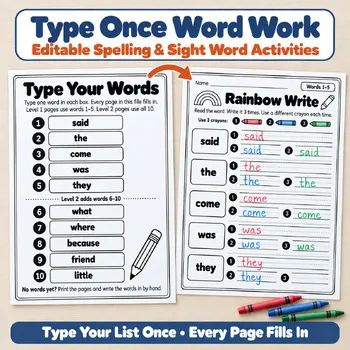
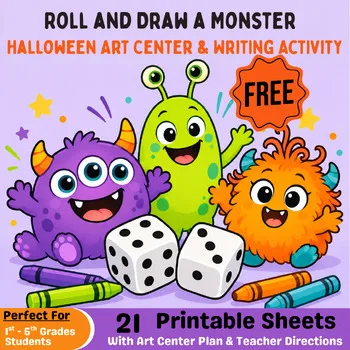
When you would rather print than build, these Activity Express resources are ready to copy, including editable word work and a free roll-and-draw activity.
Frequently asked questions
Which worksheet maker is completely free for teachers?
Canva for Education is free for verified K-12 teachers and their students. Wordwall, Kami, LiveWorksheets and StoryboardThat have free plans with limits.
What happened to TeacherMade?
TeacherMade now redirects to classwork.com and is known as Classwork Studio. Its Teacher Pro license was listed at $95 per year with a 30-day trial.
Can I print Wordwall activities?
Yes. Wordwall says any interactive activity can be printed as a worksheet for class or homework, and the paid plans list printing for offline teaching.
Is Worksheet Crafter good for special education?
It is designed for making worksheets for primary and special-needs students, with math templates, an exercise generator and 3,000+ illustrations. The company is German, so some ordering steps are in German.
Can I use these fonts and clip art in TPT products?
Only with the right license. Educlips sells commercial licenses, and KG Fonts publishes separate licensing information; read each set of terms before selling.
Make a tool for teachers?
Built something teachers love? We keep these guides fresh, so send us a new tool, updated pricing or a featured spot request.
Request a listingDisclosure: no tool on this page paid to be included and we don't earn commissions from these links. Featured placements, if we ever offer them, will be clearly labeled "Sponsored". Details were checked on each provider's official website on November 5, 2026 and can change.